XMM-Newton Phase II RPS Users Manual
5.2.4.1 Filling in EPIC MOS details
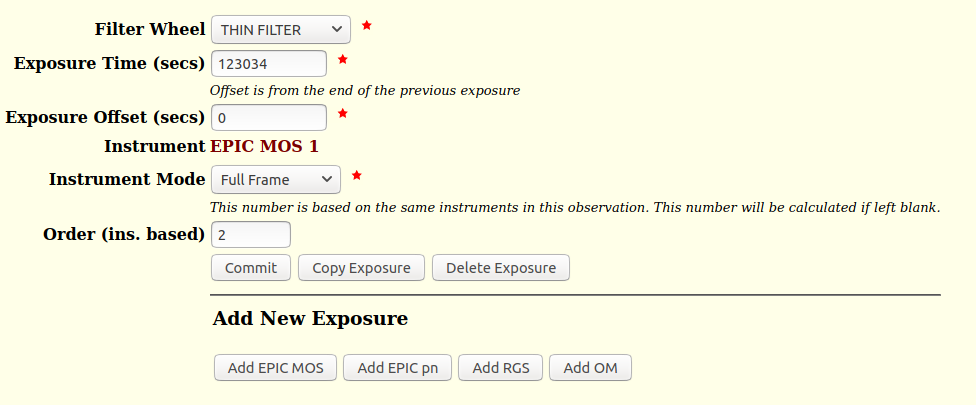
Fig. 13 displays a screen shot of an EPIC MOS
exposure form sheet. The following (mandatory) entries must be made
there.
Figure 13:
Screen shot of an EPIC MOS exposure form sheet for a
”Full Frame” imaging exposure with a duration of 123034 s and an offset
with respect to the previous exposure of 0 s. The ”THIN FILTER”
optical blocking filter was chosen.
 |
- ”Filter Wheel”, EPIC optical blocking filters
- The allowed choice of filters is presented in Table 1.
Table 1:
EPIC filters
Filter |
Description |
| CLOSED |
Blocked filter position |
| THIN FILTER |
Thin aluminium |
| MEDIUM FILTER |
Medium aluminium |
| THICK FILTER |
Thick aluminium Polypropylene |
Note to Table 1:
1) During the current AO only the highlighted filters are recommended for use.
- ”Exposure Time (secs)”
- The valid range is between 0 and 117 000 s.
- ”Exposure Offset (secs)”
- The exposure offset should be left at its default value of 0 s to ensure
continuous operation of the instrument. Only under special circumstances,
under which one would not want the instrument to operate for a
certain amount of time, should an offset with respect to the previous
instrument exposure, if any, be defined here.
The valid range is between 0 and 1 000 s.
- ”Instrument”, MOS camera unit
- When first entering this page, the ”Instrument” query will have the two
options ”EPIC MOS-1” and ”EPIC MOS-2” from which users must choose
one. EPIC MOS exposures are defined independently for both instruments.
Once specified, and once all entries have been made and successfully
committed to memory, this is not a selectable parameter anymore, but the
fixed entry will appear on the form sheet, as displayed in
Fig. 13. Therefore, it is not possible to change
a MOS-1 exposure to a MOS-2 exposure without copying it.
- ”Instrument Mode”, MOS modes of operation
- For a description of allowed EPIC modes
![[*]](../icons/crossref.png) see Table 2
below and consult the XMM-Newton Users Handbook for details.
see Table 2
below and consult the XMM-Newton Users Handbook for details.
Table 2:
EPIC MOS mode names
| EPIC MOS mode name |
| Full Frame |
| Large Window |
| Small Window |
| Timing |
- ”Order (ins. based)”
- In this field one can define the sequence of exposures using the
same instrument within an observation. If you do not specify
this parameter explicitly, the exposures will be performed just in the
order they were entered into XRPS.
European Space Agency - XMM-Newton Science Operations Centre


